
Accurate infrastructure documentation is essential for maintaining a robust environment, but it poses a common challenge: documentation tends to drift from reality, especially in dynamic infrastructures where changes occur frequently.
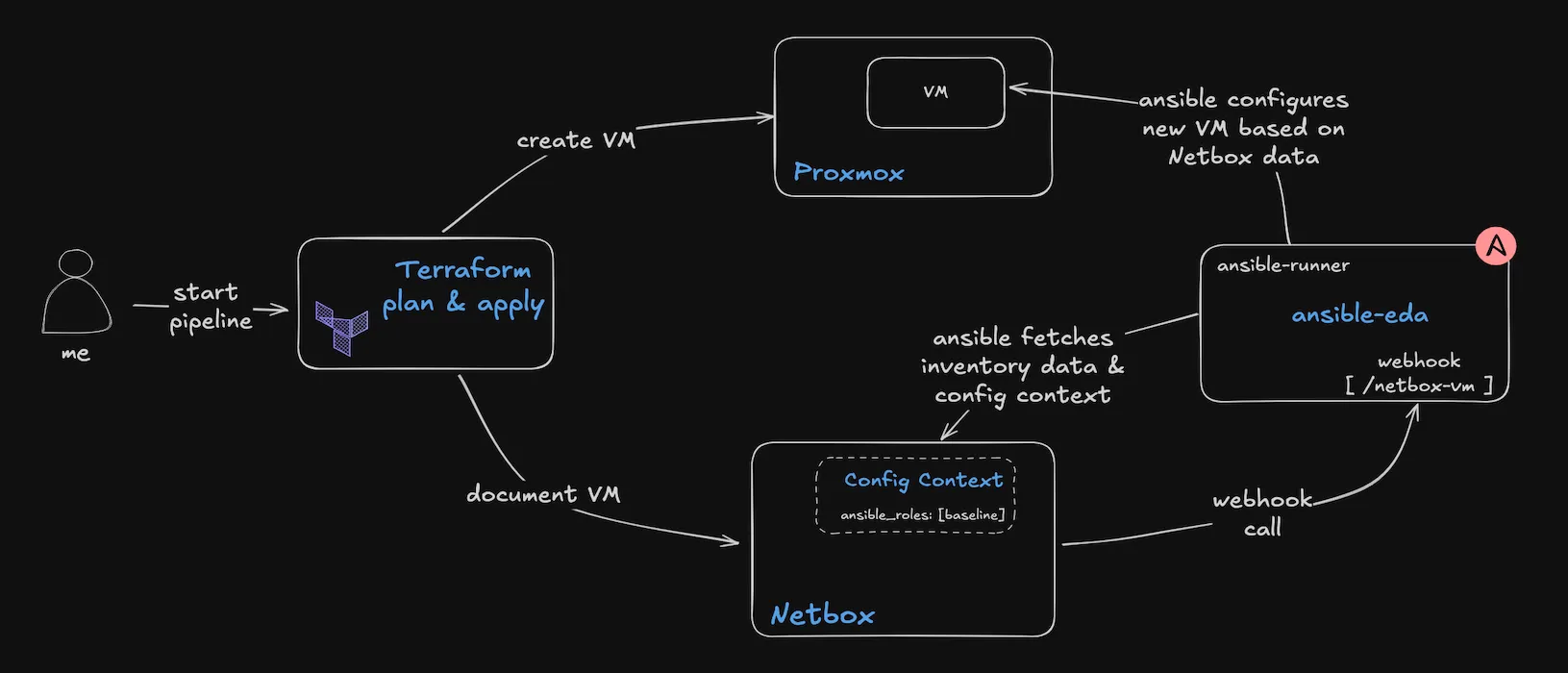
In this note I propose a workflow to create an automated infrastructure configuration system using Ansible and Netbox, where documentation becomes an active part of the automation workflow. We’ll build a process that automatically configures new virtual environments based on the documentation found in Netbox, ensuring that documentation and actual infrastructure stay synchronized. It builds on my previous notes on automating documentation with Terraform and Netbox where you can find the steps to include the documentation directly into your Terraform pipelines.
By linking documentation directly to automation, I try to address several key operational challenges: reducing manual configuration work, improve deployment times, and maintaining compliance through verifiable, reproducible processes.
Grab your favorite coffee and let’s dive into the details.
Event-Driven AnsibleSection titled Event-Driven%20Ansible
Event-Driven Ansible (EDA) transforms traditional Ansible automation by introducing event-based responses. Rather than relying on scheduled runs or manual triggers, EDA actively monitors your environment and responds to events in near real-time.
What makes EDA particularly useful is its straightforward implementation and integration capabilities. It uses the familiar YAML syntax that Ansible users already know, making it easy to define event sources, conditions, and their corresponding automated responses.
The platform is quite flexible when it comes to event sources. You can connect it to Kafka messages, webhooks, monitoring alerts, or custom scripts - whatever makes sense for your environment. When an event occurs, EDA detects it and triggers the appropriate playbooks automatically.
This automation handles everything from basic system maintenance to complex incident response workflows. For example, when a new VM gets provisioned or a critical alert fires, EDA can immediately execute the necessary playbooks without manual intervention.
The impact on operations teams is significant - teams spend less time on routine tasks and responding faster to incidents.
PrerequisitesSection titled Prerequisites
For this note, I am going to use a Netbox instance to store the virtual environment data with a custom field configured for the login user, having the name login_user.
The documentation of the new virtual machine is pushed to the Netbox instance using the Netbox API directly from the Terraform workflow I mentioned in my previous note.
EDA deploymentSection titled EDA%20deployment
At the core of Event-Driven Ansible is ansible-rulebook, which orchestrates the EDA workflows. For this implementation, I deployed a small virtual machine running the EDA components and configured specifically to handle webhook events.
You can find the manual installation steps here: https://ansible.readthedocs.io/projects/rulebook/en/stable/installation.html. Additionally, I’ve created an Ansible collection that installs and configures all necessary components, which you can find here: https://github.com/rendler-denis/ansible-rendler-collection/tree/main/rendler/eda
If you just want a deployment for testing, I’ve created a Dockerfile to build a container environment which you can find below:
Dockerfile
Used to build a testing container for EDA
# Use Python 3.11 slim as base image for smaller footprintFROM python:3.11-slim
# Set working directoryWORKDIR /opt/eda
# Install system dependenciesRUN apt-get update && apt-get install -y \ git \ gcc \ python3-dev \ libkrb5-dev \ vim \ curl \ openjdk-17-jdk \ && rm -rf /var/lib/apt/lists/*
# Install Python packagesRUN pip install --no-cache-dir \ python-dotenv \ ansible \ ansible-runner \ ansible-rulebook \ pytz
RUN mkdir -p /opt/eda
# Create a non-root user for securityRUN useradd -m -r -u 1000 ansible \ && chown -R ansible: /opt/eda
# Set environment variablesENV ANSIBLE_HOST_KEY_CHECKING=FalseENV ANSIBLE_ROLES_PATH=/opt/eda/devops/roles
# Expose port for webhook listenerEXPOSE 5000
# Switch to eda_userUSER ansible
# Install Ansible collectionsRUN ansible-galaxy collection install \ ansible.eda \ ansible.posix \ ansible.utils \ community.general \ netbox.netbox
# Keep container running for interactive useCMD ["tail", "-f", "/dev/null"]To run the container, create a local Dockerfile, copy the content and use the following commands to build and run the container:
docker build -t eda:testing .
docker run -dti --name eda -p 5500:5500 -v ./:/opt/eda eda:testing
docker exec -ti eda bashOn your EDA deployment run the following commands to create a project structure which will help to manage things easier and cleaner:
mkdir -p /opt/eda
cd /opt/eda
mkdir rulebooks inventory devopsConfiguring the Netbox integrationSection titled Configuring%20the%20Netbox%20integration
For the EDA inventory data source I am using the Netbox instance where I already document all my virtual environments.
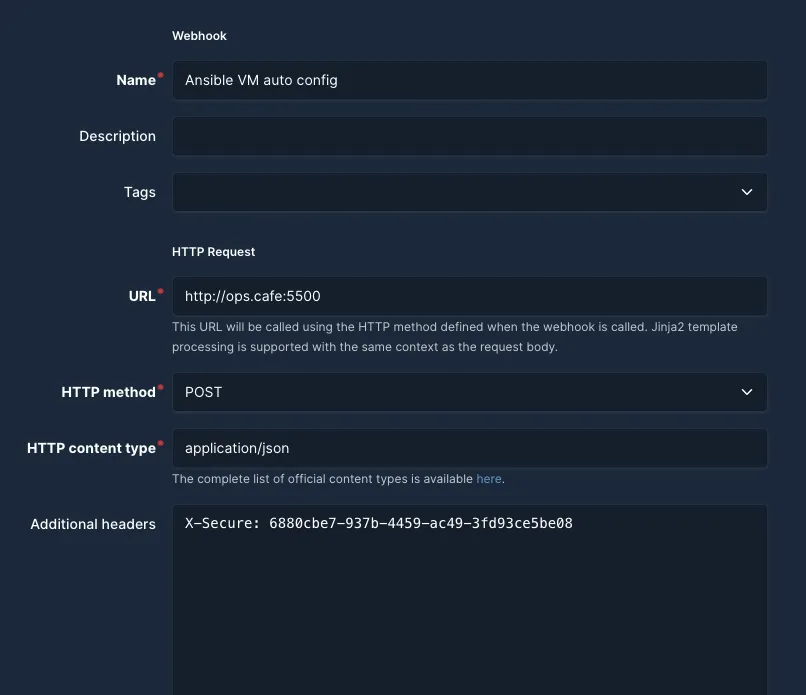
The first step requires configuring a webhook in Netbox that triggers whenever a new virtual machine is added to the inventory. This webhook will notify our EDA system, initiating the automated workflow.
Access your Netbox instance and create a new webhook under Operations > Webhooks. Fill in the form fields as shown in the screenshot below, adjusting the values to match your environment:
Next configure Netbox under Operations > Event Rules to use this webhook when a new VM has been added.
Configure as per the screenshots below but providing the settings for the name and webhook according to your setup.
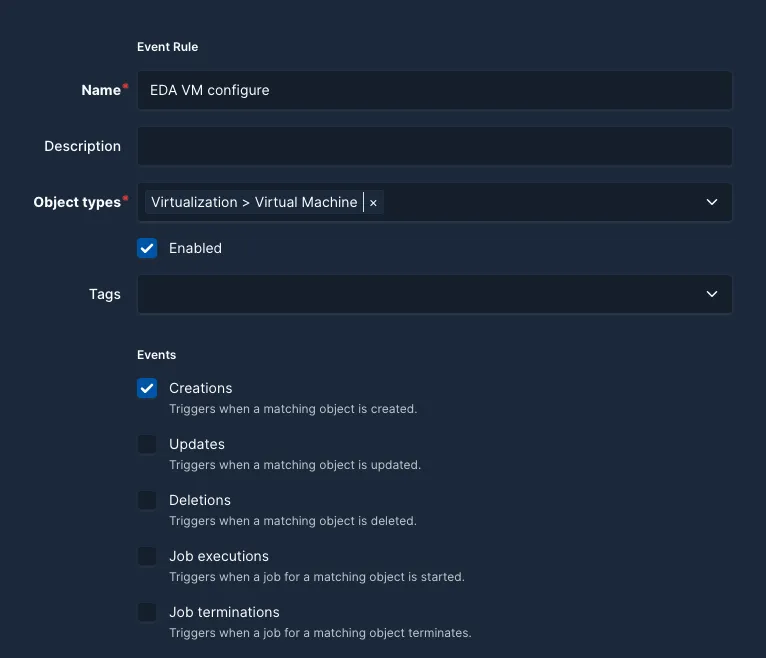
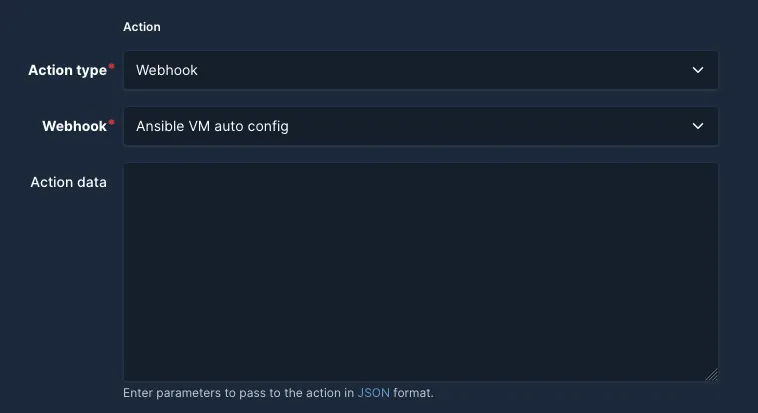
After configuring these settings, Netbox will send an event with all the virtual machine information to the EDA web endpoint every time a new ‘virtual machine’ has been added to its collection.
There’s an important timing issue in this workflow that I struggled a bit with. While EDA receives the virtual machine’s configuration when it’s first created in Netbox, it won’t include the VM’s IP address. This occurs because Netbox sends the webhook event immediately upon VM creation, but the primary IP assignment happens as a separate step in Netbox’s workflow.
Using Netbox as single source of truthSection titled Using%20Netbox%20as%20single%20source%20of%20truth
Instead of relying on the event data that the EDA workflow receives I think a better solution is to use Netbox as an inventory source and fetch the data directly through an Ansible inventory plugin. Using this approach the EDA workflow will always have the most up-to-date information about the virtual environment. And an additional advantage to this is the fact that the same inventory can be used for running other Ansible workflows without the need to synchronise data across systems.
To accomplish this task, on the EDA machine run the following commands:
cd /opt/eda/
cat > inventory/hosts.yml <<EOFplugin: netbox.netbox.nb_inventoryapi_endpoint: https://netbox.example.com # REPLACE THIS WITH YOUR NETBOX INSTANCE URLtoken: 32029.... # REPLACE THIS WITH YOUR TOKENvalidate_certs: trueconfig_context: trueansible_host_dns_name: truegroup_by: - sitesgroup_names_raw: trueinterfaces: truesite_data: truequery_filters: - role: "virtual-machine" # I use this tag on the VMs I create. Replace this with your ownflatten_config_context: truedevice_query_filters: - has_primary_ip: 'true'compose: ansible_host: "network_interfaces[0].ip_addresses[0].address" ansible_user: "custom_fields.login_user"EOFAfter running the above commands open your favorite editor and edit the three lines according to your environment.
The api_endpoint should point to your Netbox instance, the token should be replaced with your Netbox API token, which you can create under Admin > API Tokens and the role should be replaced with the tag you use to mark your VMs.
This hosts.yml configuration file will instruct all the EDA components to use the Netbox instance as the inventory, group the data by sites and filter only those virtual machine entries that have a primary IP and the role of ‘virtual-machine’ for my case.
Next step is to create a rulebook that will be used to respond to the Netbox event. For this use the following commands:
cd /opt/eda/
cat > rulebooks/netbox_vm.yml <<EOF- name: Netbox VM creation hosts: all sources: - ansible.eda.webhook: host: 0.0.0.0 port: 5500 endpoint: /netbox-vm
rules: - name: Configure VM condition: event.payload.event == "created" and event.payload.model == "virtualmachine" action: run_playbook: delay: 10 retries: 3 # this is needed because the VM might not have the primary IP set yet delay: 10 # wait 10 seconds before running the playbook again name: devops/playbooks/new_vm.yml # the playbook that will be executed, it can also be a playbook from a collection like rendler.os.baseline extra_vars: target: "{{ event.payload.data.name }}" # this will be used in the playbook to target only the new virtual environmentEOFThis rulebook configures a web endpoint on port 5500 where ansible-rulebook will listen for events.
When it receives an event it looks at its rules and when the condition evaluates to true it will execute the action, which in this case is to run the new_vm.yml playbook.
Under the hood, ansible-rulebook uses an ansible-runner to run an ansible-playbook command with the playbook we configured. That gives this workflow all the benefits of using Ansible’s ‘ansible-playbook’ with an automated twist ;).
Next, add an Ansible project to the EDA machine in the /opt/eda/devops folder.
If you don’t have an Ansible project or just want to quickly test things out you can use the following demo repository: https://github.com/ops-cafe/eda-note-ansible-demo-project
The last step now is to start the EDA workflow using this command:
cd /opt/eda
ansible-rulebook -r rulebooks/netbox_vm.yml -i inventory/hosts.ymlIf everything is configured correctly you won’t see any ouput until an event is triggered by performing a POST request to the endpoint.
For a quick test use the following command:
curl -X POST -d '{"event": "created", "model": "virtualmachine", "data": {"name": "test"}}' https://ops.cafe:5500On the EDA machine you should see a message similar to this in your /var/log/messages file:

Configure EDA as system service (optional)
In order to keep the EDA workflow working independently it needs to be configured as a system service. If EDA is running on a Linux machine use the following commands:
# create the ansible user and groupsudo groupadd ansiblesudo useradd -r -g ansible -d /opt/eda -s /bin/bash ansible
# add permissions for the ansible user on our project foldersudo chown -R ansible:ansible /opt/eda
# switch to the ansible usersudo su - ansible# to install the collections we need to run the EDA workflowansible-galaxy collection install \ ansible.eda \ ansible.posix \ ansible.utils \ community.general \ netbox.netbox
# exit the ansible userexit
# create the systemd unitcat > /etc/systemd/system/ansible-rulebook.service <<EOF[Unit]Description=Ansible Rulebook Service (EDA)After=network.target
[Service]Type=simpleUser=ansibleGroup=ansible
WorkingDirectory=/opt/eda/Environment=PATH=$PATH:/usr/local/bin:/usr/bin:/binEnvironment=ANSIBLE_ROLES_PATH=/opt/eda/devops/rolesExecStart=/usr/local/bin/ansible-rulebook --rulebook /opt/eda/rulebooks/netbox_vm.yml -i /opt/eda/inventory/hosts.ymlRestart=alwaysRestartSec=10
[Install]WantedBy=multi-user.targetEOF
# configure the permissionssudo chmod 644 /etc/systemd/system/ansible-rulebook.service
# reload systemdsudo systemctl daemon-reload
# enable and start the servicesudo systemctl enable ansible-rulebook.servicesudo systemctl start ansible-rulebook.serviceBuilding Self-Service Infrastructure with Netbox and AnsibleSection titled Building%20Self-Service%20Infrastructure%20with%20Netbox%20and%20Ansible
One of Netbox’s powerful features is its Config context functionality, which allows adding custom metadata that we can later use in Ansible playbooks.
For this example I’ve added a JSON object to the Config context field of the VM object in Netbox with the following content:
{ "ansible_roles": ["baseline"]}When the Ansible inventory plugin runs, it automatically fetches this data and makes it accessible within your playbook through hostvars[inventory_hostname].ansible_roles variable.
The playbook that is ran by this demo EDA workflow then uses this information to run the Ansible roles specified in the ansible_roles field, like this:
---- name: Configure new VM hosts: '{{ target }}' tasks: - name: Basline the new VM ansible.builtint.include_role: name: '{{ item }}' loop: '{{ hostvars[inventory_hostname].ansible_roles }}'We can extend this workflow to include more complex configurations, like using Ansible roles and collections to set up monitoring and logging, or deploying applications - essentially creating a software catalog driven entirely by Netbox data.
This approach brings significant advantages: it minimizes human intervention, accelerates deployment times, and maintains compliance through an auditable and reproducible process. By centralizing the virtual environment’s configuration data in Netbox, it is possible to create a single source of truth that drive the Ansible workflows.
Quick recapSection titled Quick%20recap
In this note, I’ve shown how to integrate Ansible automation with Netbox for infrastructure configuration management. This approach connects configuration automation directly to infrastructure documentation, providing several practical benefits:
- automated virtual environment setup based on Netbox documentation
- real-time synchronization between documentation and actual infrastructure state
- reduced manual configuration overhead
- reproducible deployment processes that can be verified for compliance
By using Event-Driven Ansible to respond to Netbox updates, we can enable automatic configuration updates when documentation changes. For example, when a new virtual environment is documented in Netbox, Ansible automatically provisions the corresponding infrastructure with the specified parameters.
I hope this note inspires you to explore the possibilities of Event-Driven Ansible and Netbox in your environment.
If you have any questions or feedback, feel free to leave a comment below and/or share this note with others.