
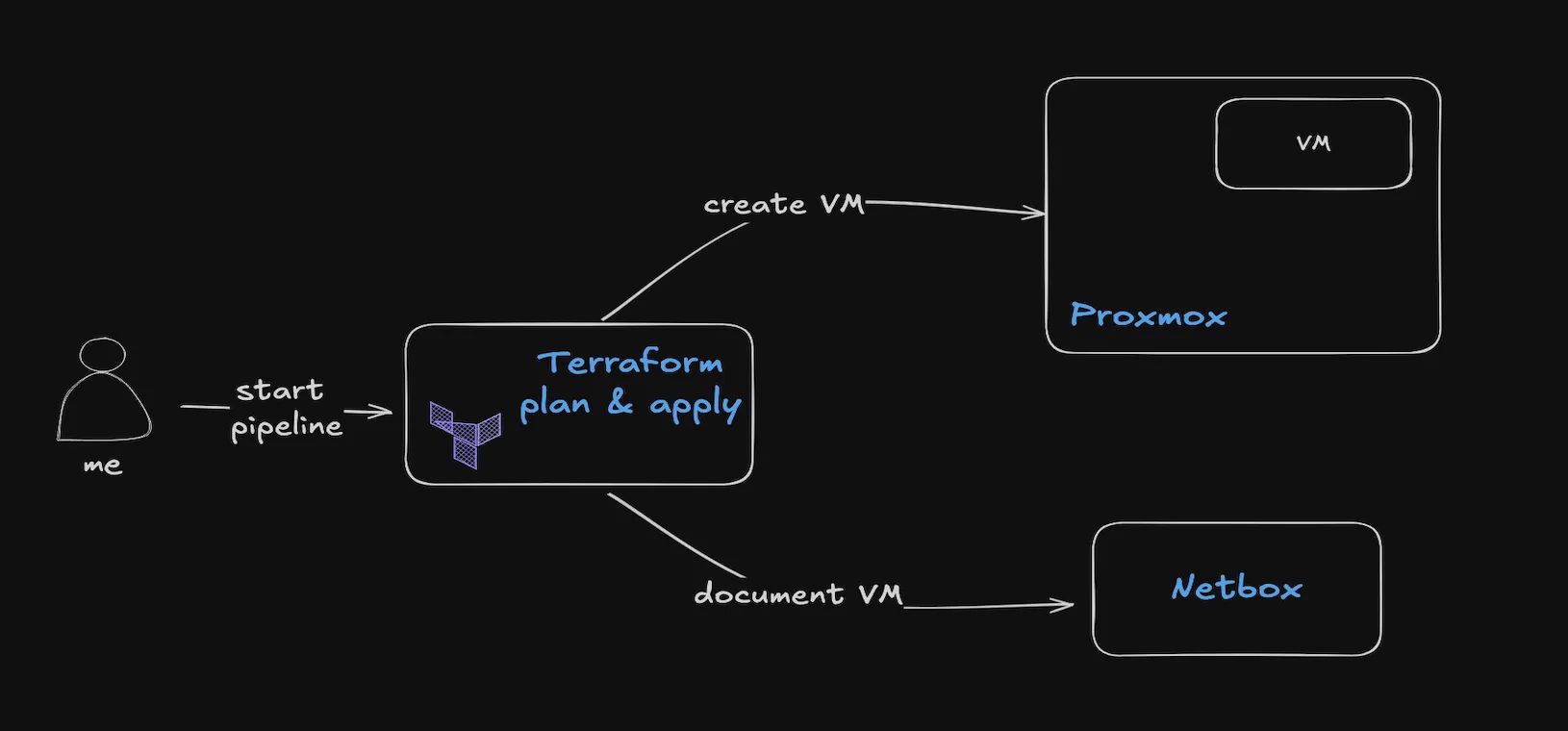
One aspect of being a compliant organization is having a good documentation of your infrastructure. That means documenting any and all changes and processes. But as the organization grows it becomes an increasingly heavy tasks for the IT teams to maintain accurate and complete documentation. Searching for a solution to help my team I found Netbox, an open-source tool that is great at documenting almost anything infrastructure related, from IPs to devices to virtual machines, down to even what ports are allocated for what VLAN on a device.
And while Netbox’s modern UI helps make documentation tasks easier, it also exposes an API that can be used to automate the documentation processes.
So grab your favorite cup of coffee and let’s begin automating.
PrerequisitesSection titled Prerequisites
For demo purposes I am going to use a Proxmox instance and my Terraform Proxmox LXC module, which you may find in the Projects section. If you don’t have Netbox installed yet, their installation process is quite easy, and for a quick testing I recommend the Docker deployment which you can find here: https://github.com/netbox-community/netbox-docker?tab=readme-ov-file#quickstart
Terraform moduleSection titled Terraform%20module
Since I use Terraform for managing the lifecycle of virtual machines I thought this is a good place to incorporate the documentation into this process. Looking into Terraform’s providers repository I found a good Terraform provider which gave me the means to accomplish the task of automating this process.
Using the Terraform modules I developed, and Terraform’s variables merge functionality, which I shared in my previous notes, I am able to simplify the variables definitions down to only the fields specific to a VM:
lxc_config.tfvars
Variables file
lxc = { "new-vm" : { cpu_cores = 2, hdd_size = "10G", memory = 4096, net = { device = "eth0", macaddr = "aa:01:d2:50:aa:09", name = "vmbr1", tag = 35 tagged = true gateway = "10.35.0.1" ip = "10.35.161.200/16" dns = "new-vm.ops.cafe" }, swap = 1024, target = "pvez", vmid = 123, device = "PVE-Z" custom_fields = { environment_type = "production" login_user = "root" } install_ssh = false tenant = "ops.cafe", site = "main_dc" }}Now that we’ve seen how simple the configuration files looks like, let’s check out the code:
main.tf
Terraform root module’s main configuration
// root module's main.tf
// create the new virtual environmentmodule "pve-lxc" { source = "github.com/rendler-denis/tf-proxmox-mod//lxc?ref=0.3.0"
for_each = var.lxc
ct_name = each.key target = try(each.value.target, null) ...}
locals { size_map = { "G" = 1 "M" = 1024 }}
// fetch the organization data that is going to be required latermodule "netbox-org-data" { source = "github.com/rendler-denis/tf-mod-netbox//netbox-data-org?ref=0.1.1"
sites = var.org.data.sites tenants = var.org.data.tenants}
// document the virtual machinemodule "netbox-docs" { source = "github.com/rendler-denis/tf-mod-netbox//netbox-virtualization?ref=0.1.1"
depends_on = [module.netbox-org-data]
for_each = var.lxc
vms = { (each.key) = { name = each.key target = try(each.value.target, null)
vcpus = try(each.value.cpu_cores, null) memory_mb = try(each.value.memory, null) vmid = try(each.value.vmid, null) state = try(each.value.state, false) ? "active" : "offline" description = try(each.value.description, null) role = "Virtual Machine (lxc)" platform = "Linux" site = try(each.value.site, null) tenant = try(each.value.tenant, null) cluster = try(each.value.cluster, null) device = try(each.value.device, null)
disks = { name = "System disk (${each.key})" size = tonumber(replace(try(each.value.hdd_size, "0"), "/[GM]/", "")) * lookup(local.size_map, substr(each.value.hdd_size, -1, 1), 1) description = "System Disk on ${each.value.storage_name}" custom_fields = { storage_name = try(each.value.storage_name, null) } }
networking = [ { ip_address = try(each.value.net.ip, null) name = "${each.key} [eth0]" vm = each.key description = "Main network interface" enabled = true mac_address = try(each.value.net.macaddr, null) mode = "tagged-all" tagged_vlans = each.value.net.tag != 0 ? (try(each.value.net.tagged, false) ? [each.value.net.tag] : null) : null untagged_vlan = each.value.net.tag != 0 ? (!try(each.value.net.tagged, true) ? each.value.net.tag : null) : null dns = try(each.value.net.dns, null) } ]
custom_fields = merge({ vm_template = try(each.value.template, null) swap_size = try(each.value.swap, null) pve_vm_id = try(each.value.vmid, null) storage_name = try(each.value.storage_name, null) vlan_name = try(each.value.net.tag, null) hostname = try(each.value.hostname, each.key) } , try(each.value.custom_fields, {})) } }
site_id_map = module.netbox-org-data.sites_map tenant_id_map = module.netbox-org-data.tenants_map}
// document the IP address used for the vmmodule "netbox-docs-ip" { source = "github.com/rendler-denis/tf-mod-netbox//netbox-ipam?ref=0.1.1"
depends_on = [module.netbox-docs]
for_each = var.lxc
ip_addresses = [ { ip_address = try(each.value.net.ip, null) status = "active" description = "Main network interface" dns_name = try(each.value.net.dns, null) tenant = try(each.value.tenant, null) site = try(each.value.site, null) vrf = "main" object_type = "virtualization.vminterface" virtual_machine_interface = format("%s [eth0]", each.key) } ]
site_id_map = module.netbox-org-data.sites_map tenant_id_map = module.netbox-org-data.tenants_map}
// update vm docs to document the vm's primary IPmodule "netbox-docs-primary-ip" { source = "github.com/rendler-denis/tf-mod-netbox//netbox-primary-ip?ref=0.1.1"
depends_on = [module.netbox-docs-ip, module.netbox-docs]
for_each = { for k, v in var.lxc : k => v if v.net.ip != null }
vms = { (each.key) = each.value.net.ip }}
variable "org" { type = object({ data = object({ sites = list(string) tenants = list(string) }) })
default = { data = { sites = ["main_dc", "alt_dc"] tenants = ["ops.cafe"] } }}
variable "lxc" { type = any default = {}}The process begins with the pve-lxc module resource, which handles the creation of LXC containers within the Proxmox environment. I then use the netbox-org-data submodule to retrieve organization information from Netbox, like tenant and site IDs, which will be required in the next steps.
The workflow continues with the netbox-docs module resource, which makes use of netbox-virtualization submodule to register the new virtual environment in Netbox. IP management is handled through the netbox-ipam submodule, documenting the container’s assigned IP address. Finally, the IP is set as the primary IP address for the virtual machine.
Since Terraform is a multi-threaded tool, I make use of the depends_on tag to make sure that the virtual environment is first created successfully before I document it. This is important since I want to keep the documentation accurate.
Along with the standard Netbox fields I also added a few custom fields to help me identify the container easier, like what template was used, what’s the initial login etc. The login info is used in the automation process which is triggered by Netbox to configure the virtual environment, but I will talk about that in a later note.
Managing a Netbox instance using TerraformSection titled Managing%20a%20Netbox%20instance%20using%20Terraform
When I started using Netbox I found that the initial setup took me quite a bit of time as there are dependencies that need to be created in a specific order. As I would like to expand the usage of Netbox to other projects I wanted to automate the inital setup process. Luckly, the Terraform provider offers the possibility to manage a big chunk of Netbox. This allowed me to abstract the setup processes in my module down to just a few variables, similar to this:
org_info = { tenants = { it_ops = { name = "IT Operations" slug = "it-ops" description = "IT Operations Team" group = "operations" } sites = { dc1 = { name = "DC1" slug = "dc1" status = "active" description = "Primary Data Center" physical_address = "123 Data Center Ave, Dallas, TX" group = "production" tenant = "network" facility = "ala balaur" region = "na" } ... }...}And while the module provides the necessary tools to manage a Netbox instance from the beginning, it is also versatile enough to be used with an existing instance data.
With the notebox-org-data submodule it will automatically fetch organization data, like tenants, and all the other submodules are using names to find Ids for interconnected objects, like devices, VLANs etc.
If you want to use it you can find it in the Projects section of this website or directly on my Github repo at https://github.com/rendler-denis/tf-proxmox-mod
Final thougthsSection titled Final%20thougths
As a cyber-security professional I now understand better why infrastructure documentation is a critical aspect of maintaining a compliant and well-organized environment. And automating this process with Terraform and Netbox has helped me lessen the burden. By combining these powerful tools, I’ve managed to create a workflow that not only saves time for my colleagues but also ensures consistency and accuracy in the documentation.
The modular approach I’ve shared in this note allows for flexible implementation, whether you’re starting fresh or integrating with an existing Netbox instance. The ability to manage everything from virtual environment creation to documentation in a single automated process will significantly reduce the operational overhead for IT teams.
Remember, good documentation doesn’t have to be a burden. With the right tools and automation in place, it’s easy to make it an integral part of your infrastructure management process rather than something “nice to have”.
I’d love to hear about your experiences with infrastructure documentation automation. Have you implemented similar solutions? What challenges have you faced? Feel free to share your thoughts in the comments below.